
Managing Voicemail
Your Follow-Me with Voicemail Service comes equipped with a built-in voicemail box. You may access your voicemail messages from any touch-tone phone or the web.
Voicemail Highlights:
- Listen to, save, or delete voicemail via the phone or web
- Instantly call back anyone who has left you a message without dialing a phone service
- Forward voicemail via email through the web
- Forward voicemail to other employees or groups of employees who have voicemail through the phone or web
- Download voicemail to your computer for later listening through the web

Phone Interface
To listen to voicemail over the phone- Press the voicemail button on the phone.
- Enter your PIN when prompted.
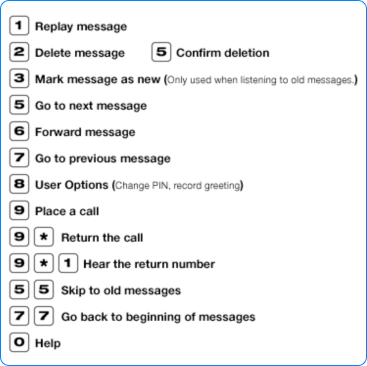
Note: You may touch 9* to call the person back who has left you a message, providing the system was able to capture his or her caller ID. You may touch ## to rebound back to your voicemail box when finished with the call.

Web Interface
To listen to voicemail via the Web:- Go to cp.serverdata.net/voice.
- Enter your phone's phone number and PIN.
- Click the voicemail button on the left of the page (if the voicemail management page is not visible).
- Click the Play button associated with the voicemail you wish to listen to.
- You may also forward voicemail messages via email by clicking the Forward button and filling out the on-line form.